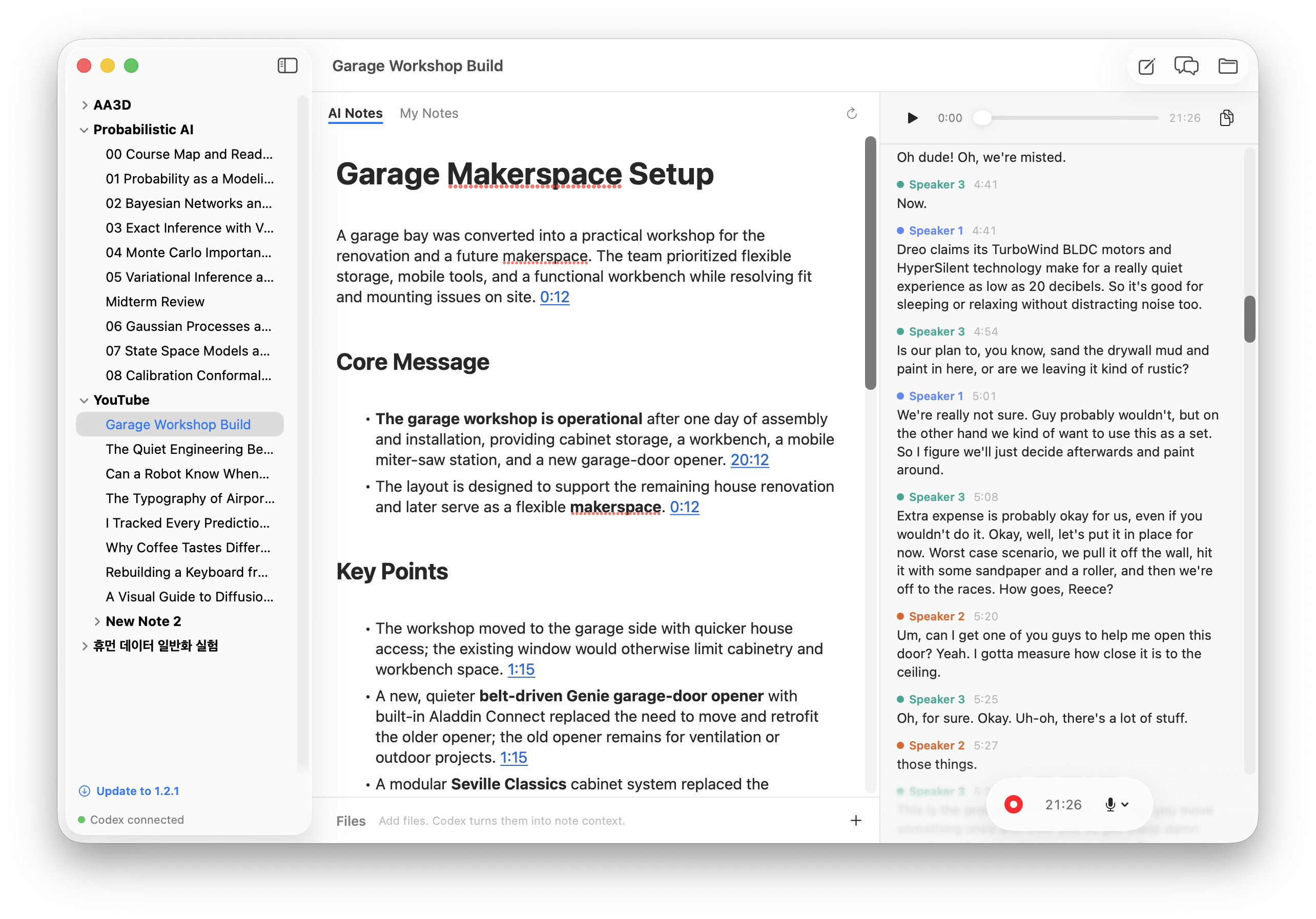
Use your ChatGPT plan for live, speaker-labelled meeting transcripts, saved as plain files.
Intel Mac support is not ready yet.
We are looking for contributors to help build it.
Help on GitHub.
Even a free ChatGPT account includes dictation-grade speech-to-text and a generous amount of model usage. Simbi combines them with a small speaker model that runs entirely on your Mac.
A compact speaker-separation model runs on the Apple Neural Engine and works out who is talking in about a second, without sending audio anywhere.
Speech is cut into clean per-speaker segments and transcribed by the same backend that powers dictation in the ChatGPT app. Far more accurate than local models, and easy on your battery.
Transcript fixing, file conversion, summaries, and chat are Codex threads in the ChatGPT desktop app. Your plan, your models, your context.
The hard parts are already solved, and solved well. Simbi assembles mature open-source projects and spends its own code on the glue: mixing two audio sources onto one timeline, deciding where to cut speech, and keeping every note a plain folder.
No database, no proprietary format, zero walls. If you can see it in Finder, it is yours.
~/Simbi/Work/2026-07-15 Standup/~/Simbi/Work/Standup/

├─ note.md          your notes, plain Markdown
├─ audio.webm       the recording, Opus
├─ transcript.vtt   transcript with speaker labels
├─ files/           anything you drop in
└─ context/         Markdown mirrors, written by Codex
audio.webm and transcript.vtt into VLC and the recording plays with speaker-labelled subtitles in sync.A Codex thread watches the transcript as it grows, fixes mis-hearings using your files as context, and names speakers when the conversation reveals who they are.
After each recording Simbi writes a summary whose citations are timestamps. Click one and playback jumps to that moment in the audio.
Drop a PDF or a slide deck onto a note. Codex converts it to clean Markdown that becomes context for transcript fixes and chat.
One click opens a Codex chat with your note, transcript, and files already in context.
Record your mic and the other side of the call together: system audio is captured and mixed into one timeline.
Audio streams straight to disk in a crash-tolerant format. If your Mac dies mid-meeting, the recording survives.